Project overview
AllHands is a family management app designed for households to organize schedules and daily responsibilities through a shared system. This household app will help assist users by creating a chore system, an organized calendar, smart budgeting, and shopping lists.
Having a synced app across multiple devices allows the whole household to be on the same page helping with communication. The app will reduce conflict across the household and help with transparency of responsibilities to hopefully alleviate some of the stress of every member at home.
Process
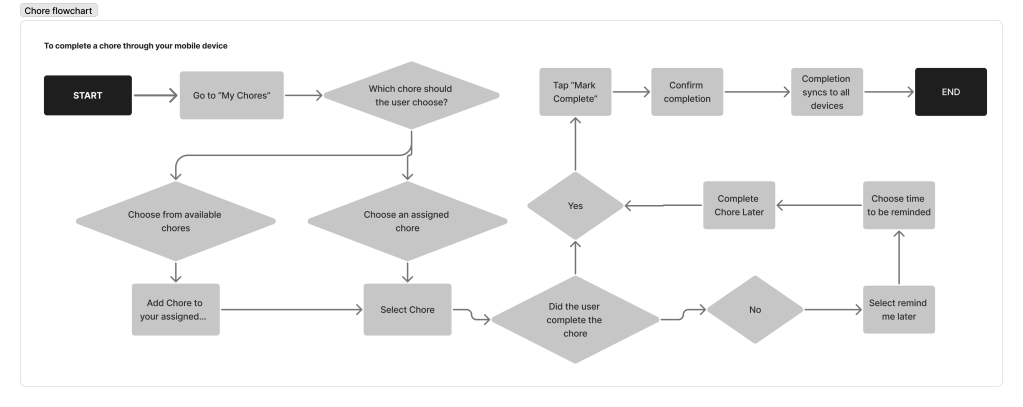
With the main feature being chore and responsibility management, I used flowcharts and sketches to get the framework for the app. Mapping out the features across different devices flushed out the scope of the app and showed the main function of each device.
| Feature table | |||||
|---|---|---|---|---|---|
| Mobile | Tablet | Desktop | Automated? | Monetized? | |
| View tasks to do today | ✔️ | ✔️ | ✘ | ✔️ | ✘ |
| Calendar | ✔️ | ✔️ | ✔️ | ✔️ | ✘ |
| Grocery list | ✔️ | ✔️ | ✘ | ✘ | ✔️ |
| Reward system | ✔️ | ✔️ | ✘ | ✔️ | ✔️ |
| Trade chores | ✔️ | ✘ | ✘ | ✘ | ✘ |
| Setup and settings | ✘ | ✔️ | ✔️ | ✘ | ✔️ |
| Reminders | ✔️ | ✘ | ✘ | ✔️ | ✘ |
| Adjust/ create chores | ✘ | ✔️ | ✔️ | ✘ | ✘ |
| Ways to automate: Once setup is complete recurring chores and tasks can be automated. A lot of calendar functions can be automated. Mobile systems can track phones if parents want to set up location tracking. Different urgent tasks and events can be set to priority which always remind users beforehand. | |||||
| Ways to monetize: There are ways to offer a subscription for premium features or support ads on desktop and mobile screens | |||||
I choose to design the mobile device first then the tablet device and then finally the desktop device. Starting with mobile allowed me to focus on the app’s essential interactions and simplify the core user experience before expanding it to larger screens.
Design decisions
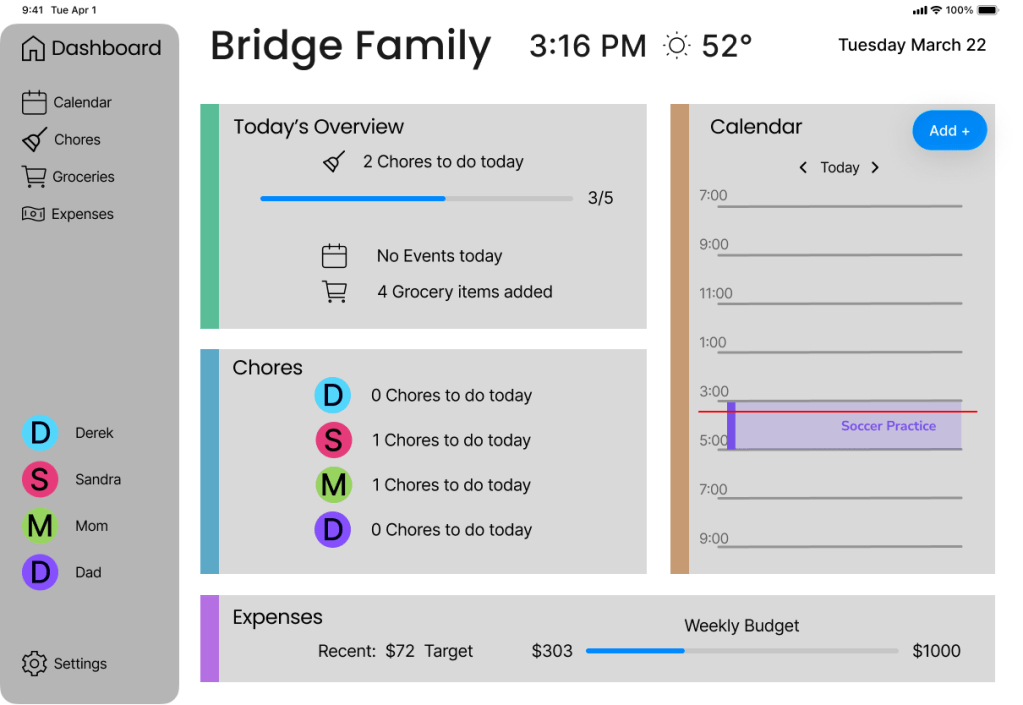
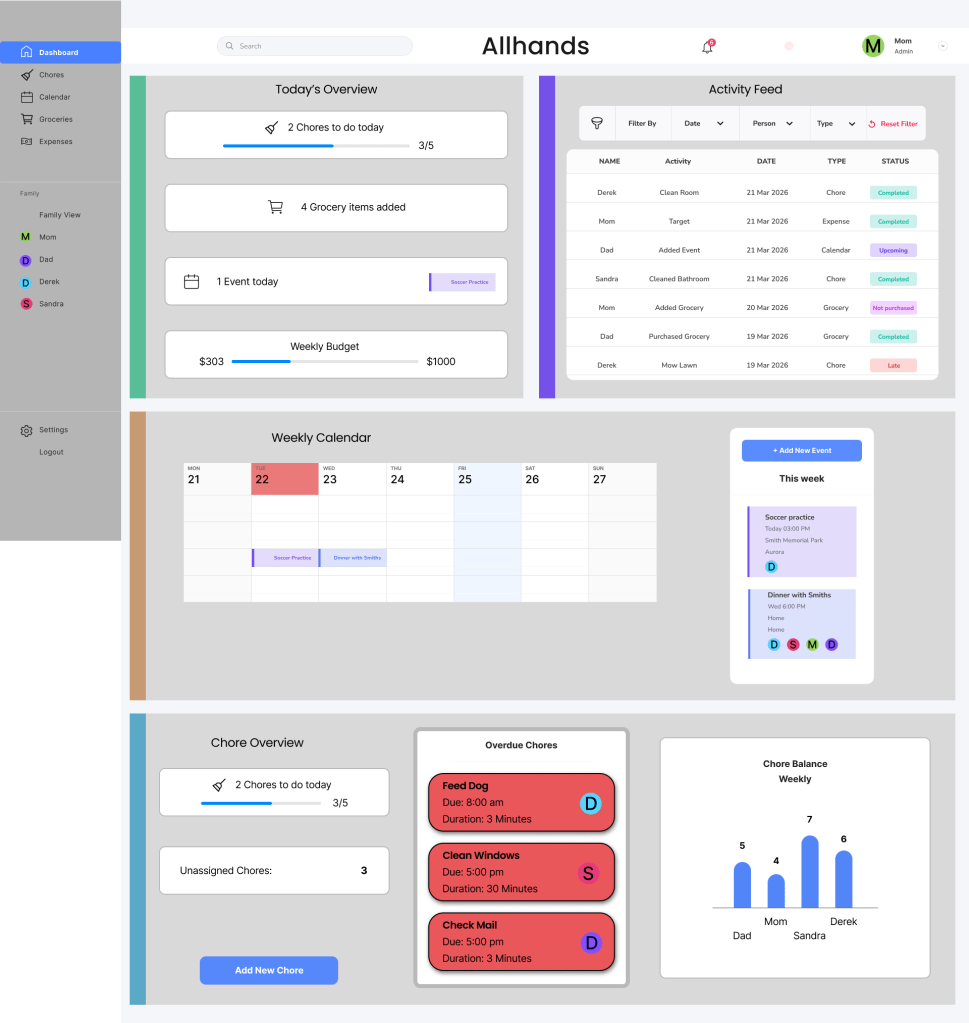
One of the most important design decisions in this project was creating different dashboard experiences for each device type rather than simply scaling the same layout across screens. I wanted each platform to support the way users naturally interact with that device.
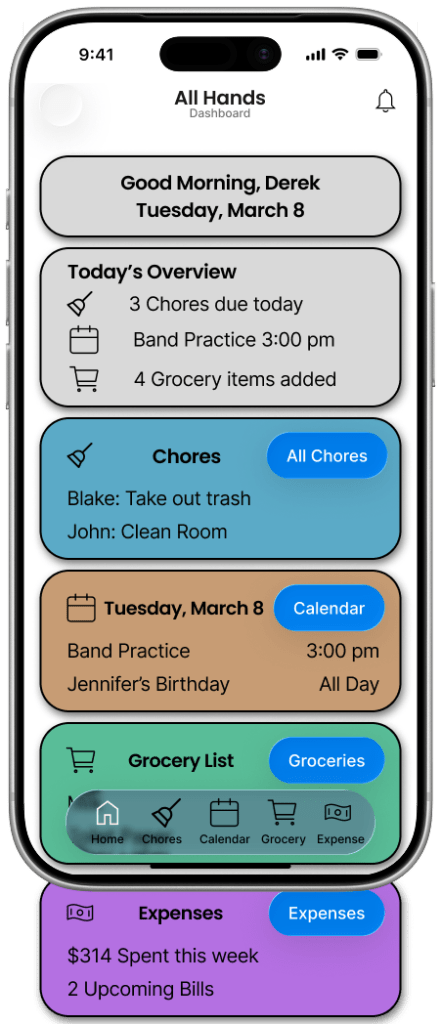
During accessibility testing, I found that only having icons on the navigation bar limited new users or users that struggled with icon correlation. Adding labels would help the outliers of the wide audience AllHands caters towards.
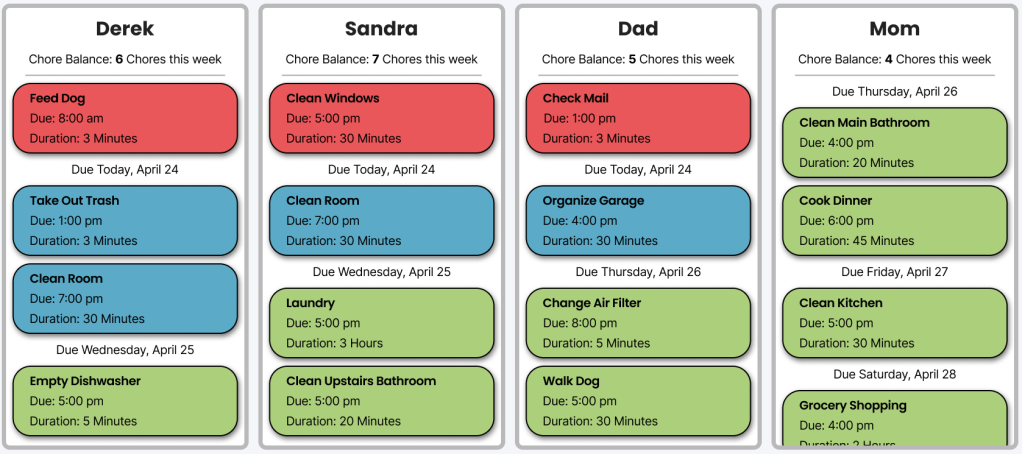
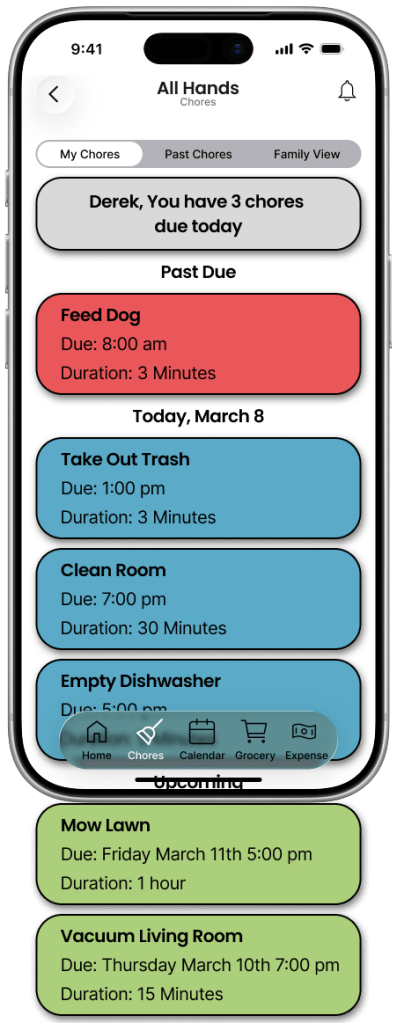
Another important design decision was implementing a consistent color coded status system for chores across all devices. Chore cards changed color depending on their status, such as upcoming, due today, overdue, or completed.
Cross-device design
Mobile Device
Mobile apps are the moving pieces that bring the whole house together. Since everyone aside from young kids most likely have a phone, everyone can manage their own tasks and schedule. This also allows every member to check in on their household even on the go.
Tablet Device
A tablet device is perfect for a shared accessible device that any household member can interact with or glance at to quickly see the status of the house. The tablet can show all the tasks in an even and fair way including every member together, promoting equality and unity.
Desktop Device
A desktop device is the easiest to manage the settings and admin work of the household. It is also where most systems will startup and the first impression of the app itself. It also will be used by members who may work on the computer and is easy to access the calendar and tasks.
Several interface elements changed between devices for usability reasons. Navigation shifted from a bottom navigation bar on mobile, to a persistent sidebar on tablet and desktop. Information also increased gradually across devices, with desktop showing significantly more content simultaneously than mobile.
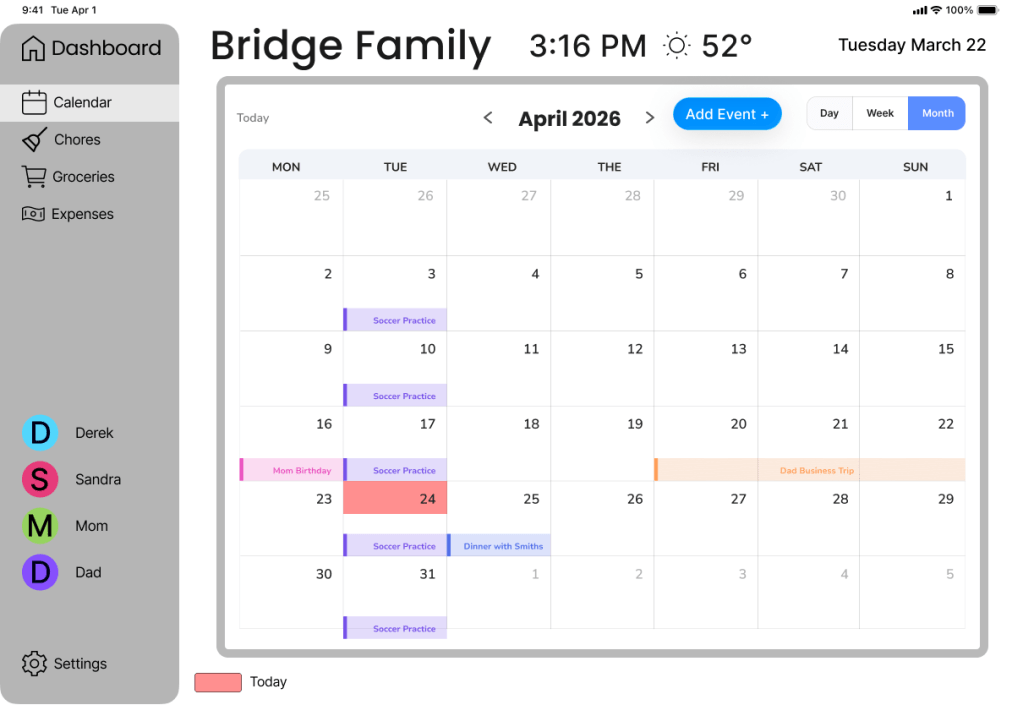
By adapting the experience across the three devices, the design aimed to create a system that felt consistent in functionality while still feeling natural and optimized for the strengths of each platform. For instance the tablet device was designed for a shared environment with primary flows that emphasized planning and schedule awareness rather than quick actions through interfaces like a calendar.
Accessibility
One key recurring problem was designing for young users and children. Since in a family household many kids don’t have personal cellphones, the shared family device has to be designed for the widest audience. Using the calendar interface to show chores was an accessibility decision to include all users.
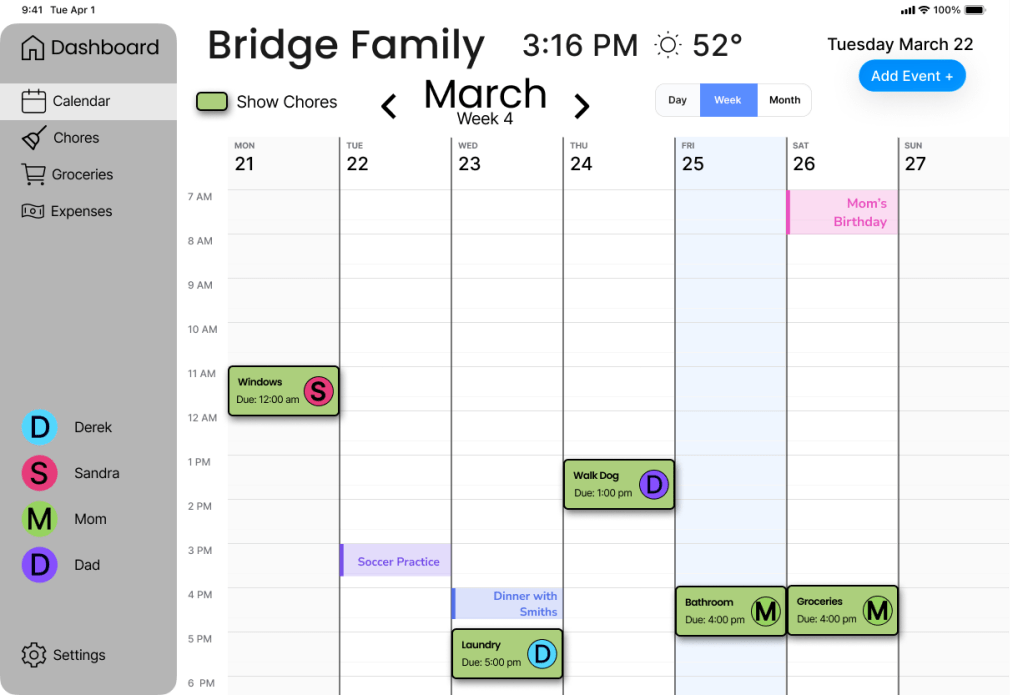
Some households may not have access to a tablet device, so the app has to be fully functional for isolated devices such as only using the phone device.
Reflection
If starting this project over, I would start designing from the web device since it is the most information dense screen and designing down from there would allow for the whole system to look more cohesive.
Figma limits the features you can actually prototype in, future improvements could include draggable chore blocks and interactive calendar elements. Also only the calendar and chore sections of the app were designed, features of the app including the grocery and expense sections would drastically increase the usability scope and allow for AllHands to be an all-in-one household app.
AI tools
I used ChatGPT to generate synthetic personas for usability and accessibility testing. This allowed me to user test the app without spending resources to test different target users. With any AI tool understanding the limitations and broad responses is crucial when designing for humans.
 derekbridge66-jxepb